
Download SmartPayroll Mobile APK – payroll management, employee payments, pay run, pay packets, payroll administrator, payroll processing, cloud-based payroll, pay group, leave tracking, pay run authorization, payroll tracking, payroll app
Overview
SmartPayroll Mobile is a cloud-based mobile application designed to support payroll administrators and business owners in managing employee payments efficiently. The app enables users to review and process pay packets, authorize pay runs, and monitor upcoming payroll deadlines. It serves as a mobile extension of the SmartPayroll web platform, allowing users to stay connected to their payroll operations while on the go. The software is particularly suited for professionals managing payroll for small to medium-sized businesses, especially within the New Zealand market, where it is trusted by thousands of employers. Its core purpose is to streamline payroll workflows by offering real-time access to pay data and enabling critical actions directly from a mobile device. The app supports multiple pay groups, allowing administrators to manage diverse employee categories within a single system. Users can also add leave entitlements to pay runs, which helps maintain accurate compensation records. The application is a legacy product of Smartly, indicating its established presence in the payroll software space. While specific details about the developer’s broader history were not provided, its integration with the Smartly ecosystem suggests a focus on business efficiency and financial administration.Key Features & Capabilities
- Pay Run Authorization: Users can review and approve pay runs directly from their mobile device, ensuring timely processing without requiring access to a desktop system.
- Pay Packet Management: The app allows administrators to view and verify pay packets before finalization, improving accuracy and reducing errors in employee compensation.
- Payroll Tracking: Users can monitor the status of recent pay runs, including the amount banked, helping to maintain financial transparency and audit readiness.
- Multiple Pay Groups: Support for managing different employee groups within one payroll system enables tailored processing for various roles or contracts.
- Leave Integration: The ability to add leave to pay runs ensures that employee absences are properly accounted for in compensation calculations.
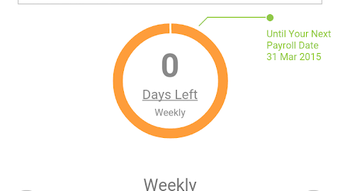
- Next Payroll Due Alerts: The app provides visibility into upcoming payroll deadlines, helping users avoid delays and maintain compliance with payment schedules.
User Interface, Workflow & Performance
The user interface of SmartPayroll Mobile is designed for clarity and ease of navigation, prioritizing essential payroll actions such as reviewing pay packets and authorizing runs. The layout follows a clean, task-oriented structure, with key functions accessible from the main dashboard. Navigation is intuitive, allowing users to move between pay runs, employee details, and payroll history with minimal steps. The workflow is streamlined to support quick approvals and data checks, reducing the time needed to complete payroll tasks. Users can filter pay runs by date, status, or pay group, enhancing efficiency when managing multiple payroll cycles. The app maintains consistent performance across devices, though exact performance details were not specified. General software behavior patterns suggest stable operation under normal usage conditions. The developer did not provide additional system requirements or resource usage metrics. Stability appears to be maintained through regular updates, as the app is described as being constantly updated with new features. The mobile experience is optimized for touch interaction, with responsive buttons and readable text. While the app does not include advanced analytics or reporting tools, its core functions are executed with minimal friction. Overall, the workflow supports a seamless experience for users who require quick access to payroll data and approval capabilities.Compatibility & System Requirements
SmartPayroll Mobile is available for Android devices, making it accessible to users on the most widely used mobile operating system. The current version is 2.1.2, with an installation size of 40 MB, indicating a lightweight footprint that should not strain device storage. The app is designed to run on standard Android devices, though specific hardware requirements were not listed. The developer did not specify minimum RAM, CPU, or screen resolution standards. Compatibility information was partially provided, with the OS clearly stated as Android. Users should ensure their device is running a supported version of Android, though the exact version range was not disclosed. The app is cloud-based, meaning it relies on an internet connection to sync data with the SmartPayroll web platform. Offline functionality was not mentioned, so users should expect that all actions require an active network connection. The application is free to download and use, with no in-app purchases or subscription tiers reported. This makes it accessible to a broad range of users, including small business owners and payroll administrators who may be operating on tight budgets.Pros and Cons
Pros
- Free to download and use, reducing entry barriers for small businesses.
- Cloud-based design ensures real-time data synchronization across devices.
- Supports multiple pay groups, enhancing flexibility in payroll management.
- Enables remote pay run authorization, improving workflow efficiency.
- Includes leave tracking integration for accurate employee compensation.
- Provides visibility into upcoming payroll deadlines and recent banked amounts.
Cons
- Only available for Android, limiting access for iOS users.
- Exact system requirements were not specified, which may affect compatibility on older devices.
- Offline functionality was not confirmed, restricting use in low-connectivity environments.
- Limited to payroll review and authorization; does not support full payroll setup.
- App size, while small, may still be a concern for users with severely limited storage.
FAQ Section
Is SmartPayroll Mobile available for iOS devices?
The app is currently available only for Android devices. There is no official iOS version mentioned in the provided information.
Can I use the app without an internet connection?
The app is cloud-based and requires an active internet connection to sync data with the SmartPayroll platform. Offline functionality was not confirmed.
Is the app free to use?
Yes, SmartPayroll Mobile is offered free of charge. There are no reported in-app purchases or subscription fees.
What version of Android is supported?
The specific Android version requirements were not provided. Users should ensure their device is running a modern, supported version of the operating system.
How often is the app updated?
The app is described as being constantly updated with new features, indicating regular maintenance and improvements by the developer.







